Changing line properties of a shape line
- Global setting of the line properties via
 Configuration / All Shapes tab
 - In the shape regarding a shape line
Changing Line Properties:
- In the Line Table
- Direct change of a line property in the corresponding column of the table
- Select a line in the table, open the tool window with the
 Line Properties button and make the desired entries.
 - In the
 document window
 - Position the cursor on a line of the displayed graphic -> open the context menu with RMB and select -> Line Properties and make the desired entries in the tool window.
|
|
1 |
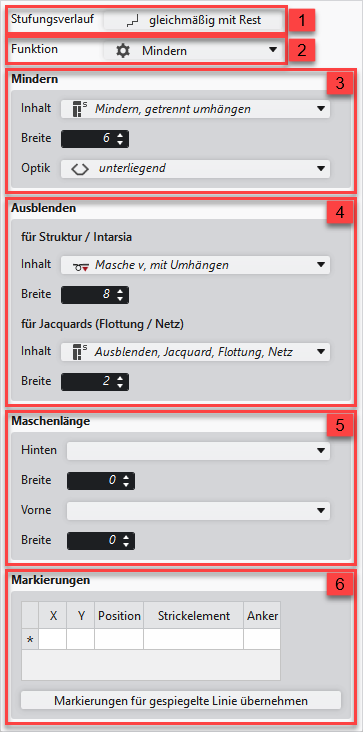
Modification of the curve type |
|
2 |
Modification of the function of a shape line
| |
|
3 |
Modifications for the shape line with the Narrowing function | |
|
4 |
Modifications of the Fading-out attribute for a shape line | |
|
5 |
Specification for a shape line for working with PTS in the shape edge | |
|
6 |
Display of the markings that are assigned to a shape line. | |
|
Apply Markings to Mirrored Line |
Applies the line-bound markings of the selected line to the line on the opposite.
| |
 : Perhaps existing markings of the opposite shape line are removed.