Create Color Arrangements for example 1 with the Qs weft yarn carrier.
Example 1: Create a Color Arrangement for structure with weft yarn and weft yarn presser foot to use a Qs weft yarn carrier:
- Design Pattern is created with different colors.
- 1
- Select the desired rows in the Row control column.
- 2
- Position the cursor in the pattern area.
- 3
- Call up the Selection
/ Create Color Arrangement:
context menu.
- or -
Click directly the button in the ribbon.
 - The Color Arrangement Editor will be opened.
- 4
- Make the desired entries in the editor with the tools for Color Arrangements from the CA and Needle Actions / Colors tabs.
- 5
- Insert 2 rows for each pattern row into the executing area of the Color Arrangement:
- 1st row: Transferring (distributing) of the stitches
- 2nd row: Knitting the weft yarn
- 6
- Draw the desired transferring into the row inserted at first for the first pattern row by the transfer needle action.
- 7
- Define this row as an additional row by
 Increase reference row number by 1.
 - 8
- Enter the following information into the row inserted at second for the first pattern row:
- Draw in the
 Float needle action with any desired yarn color, e.g. yarn color #3.
 - Define the row as additional rows by
 Keep reference row number
- 9
- Enter the following information into both existing reference rows of yarn color #6:
- In the reference column with reference number, change the
 Increase reference row number by 1 to
  Keep reference row number.
 - In the search area of yarn color #6: Needle Actions
 Front Stitch with Transfer
 - In the search area of yarn color #3: Needle Action
 Rear Stitch with Transfer
- 10
- Make the same entries for the second pattern row as well.
- 11
- Make entries to the following control columns:
-
 System:
 - specify the desired system allocation (not mandatory)
-
 Sorting Technical Rows:
 - The
 Inlay Row of Weft Yarn symbol in the technical row with the weft yarn
 - The
 Enclosing Row of Weft Yarn symbol in the technical row for enclosing the weft yarn by stitches
 -
 W Presser Foot :
 - Enter the desired type of weft yarn presser foot e.g.
 in the technical row for enclosing the weft yarn by stitches
 -
 Presser Foot Correction :
 - Set a different ESCI index for each of both the carriage directions in those technical rows in which the weft yarn presser foot is active.
|
Version 1: CA 1 |
Version 2: CA 2 |
|
|
|
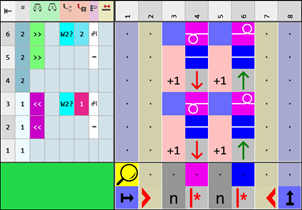
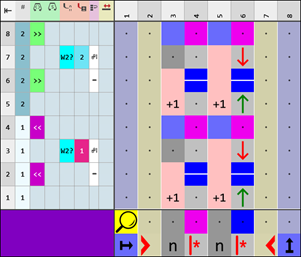
- 12
- Check the generated Color Arrangement on correct entries with the
 Manually button.
 : The knitting procedure cannot be checked!
 - 13
- If necessary, in case of a Color Arrangement already used in the design pattern, apply the changes to the basic pattern with the
 Apply button.
- or -
Close the tool window with button.
 - 14
- Close the prompt with the desired button:
-
Save: Color Arrangement is saved locally in the
 CA tool window.
 - Reject: The changes will not be saved.
-
Copy: The changed Color Arrangement is saved as copy in the CA tool window.
- 15
- Enter the generated Color Arrangement via the
 control column into the desired rows of the design pattern.
- The Color Arrangement is expanded by the technical processing.