Needle Actions
Needle Actions
Home tab -> Tool Windows -> Needle Actions
In the Needle Actions tool window select the needle actions to draw.
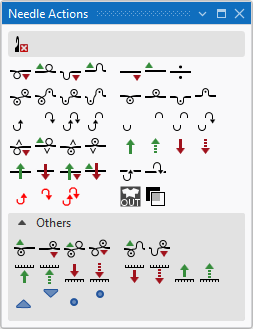
The following symbols are available for selection.
 With every needle action with transfer, is the transfer carried out first, when necessary, and then the needle action.
|
|
Delete Needle Action / Knitting Element Symbol Can be selected in addition (with the CTRL key pressed) to a needle action. Only the selected needle action is deleted when drawing. All the other needle actions are retained. |
|
|
Front Stitch with Transfer |
|
|
Rear Stitch with Transfer |
|
|
Front Tuck with Transfer |
|
|
Rear Tuck with Transfer |
|
|
Float with automatic transfer to the front |
|
|
Float with automatic transfer to the rear |
|
|
Float |
|
|
Front Stitch - Rear Stitch |
|
|
Front Stitch - Rear Tuck |
|
|
Front Tuck - Rear Stitch |
|
|
Front Tuck - Rear Tuck |
|
|
Front Stitch |
|
|
Rear Stitch |
|
|
Front Tuck |
|
|
Rear Tuck |
|
|
Casting-off in Front |
|
|
Casting-off at Rear |
|
|
Casting-off in Front - Casting-off at Rear |
|
|
Casting-off in Front - Loop sinking at Rear |
|
|
Loop sinking in Front - Casting-off at Rear |
|
|
Loop Sinking in Front |
|
|
Loop Sinking at Rear |
|
|
Loop sinking in Front - Loop sinking at Rear |
|
|
Split-stitch in Front with Transfer |
|
|
Split-stitch at Rear with Transfer |
|
|
Split-stitch in Front |
|
|
Split-stitch at Rear |
|
|
Transfer to rear |
|
|
Transferring optionally to the Rear |
|
|
Transfer to Front |
|
|
Transferring optionally to the Front |
|
|
Weft yarn / Transferring to the Rear with Float |
|
|
Weft Yarn / Transferring to the Front with Float |
|
|
Weft yarn / Transferring to the Rear with Preparing |
|
|
Weft yarn / Transferring to the Front with Preparing |
|
|
Weft yarn / Casting-off in Front with Float |
|
|
Weft yarn / Casting-off at the Rear with Float |
|
|
Cast-off in front without dissolving stitches |
|
|
Cast-off at rear without dissolving stitches |
|
|
Cast-off in front - Cast-off at rear without dissolving stitches |
|
|
Outside Shape |
|
|
Transparent |


Others
|
|
Front Stitch with Transfer to the Rear | |
|
|
Rear Stitch with Transfer toward Front | |
|
|
Front Stitch - Rear Stitch with Transfer to the Rear | |
|
|
Front Stitch - Rear Stitch with Transfer to the Front | |
|
|
Front Stitch - Rear Tuck with Transfer to the Rear | |
|
|
Front Tuck - Rear Stitch with Transfer to the Front | |
|
|
Transfer from front needle bed to rear additional needle bed | |
|
|
Optional transfer from front needle bed to rear additional needle bed | |
|
|
Transfer from rear needle bed to front additional needle bed | |
|
|
Optional transfer from rear needle bed to front additional needle bed | |
|
|
Transfer from rear additional needle bed to front needle bed | |
|
|
Optional transfer from rear additional needle bed to front needle bed | |
|
|
Transfer from front additional needle bed to rear needle bed | |
|
|
Optional transfer from front additional needle bed to rear needle bed | |
|
|
Do not sink at front Can be drawn in addition to Do not sink at rear and to needle action Stitch (only BMS) or Tuck. The technical processing controls the selection and removes the Do Not Sink needle action from invalid combinations. | |
|
|
Do not sink at rear Can be drawn in addition to Do not sink at front and to needle action Stitch (only BMS) or Tuck. The technical processing controls the selection and removes the Do Not Sink needle action from invalid combinations. | |
|
|
Motif Thread at Front | |
|
|
Motif Thread at Rear | |


When to use Not Sunken Stitch? (only BMS)
- Useful with structures with SJ and DJ in a knitting row
- Problem without Not Sunken Stitch :
- A common NP position for SJ (about NP12) and DJ (about NP9.0)
- The DJ area is accordingly sunk too deep and has to be balanced using the opposite side.
- This is not always possible or knit-able depending on the yarn and desired stitch tension.
- With Not Sunken Stitch :
- Only in the DJ area it is knitted with Not Sunken Stitch
- Normal stitch is knitted in the SJ area.
- The stitch length in the DJ area is balanced using the the opposite knitting system. As a result the DJ area is clearly knitted tighter and more reliable.
- The loop sinking depth can be adjusted mechanically at the carriage of the BMS.