Shape Symbols
Shape Symbols
Home tab -> Tool Windows -> Shape Symbols
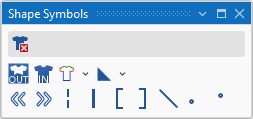
In the Shape Symbols tool window select the shape symbols to draw.
|
|
Delete Shape Data Can be selected in addition (with the CTRL key pressed) to a shape symbol. Only the selected shape symbol is deleted when drawing. All the other shape symbols are retained. |
|
|
Outside Shape |
|
|
Within Shape |
|
|
Shape Edges (F2)
|
|
|
Shape Markings
|
|
|
Align to the left |
|
|
Align to the right |
|
|
Goring |
|
|
Separation |
|
|
Fill Neckline |
|
|
Fill Neckline |
|
|
Fading-out |
|
|
Stitch Length at Shape Edge at Front |
|
|
Stitch Length at Shape Edge at Rear |


 A selected shape symbol overwrites the existing shape symbols when inserting it into the pattern. You can enter it additionally with the CTRL key pressed. You can remove it by the CTRL-ALT key.