Line Options Bar
|
Line Weight |
Enter the Line Weight. | |
|
Orientation |
|
Draw line at the left on the cursor. |
|
|
Draw line at the left and right on the cursor. | |
|
|
Draw line at the right on the cursor. | |
|
Stroke |
Set the length of the strokes of a dash line. | |
|
Gap |
Set the length of the gaps of a dash line. | |
|
|
Create a freehand line. | |
|
|
Create a line with an even step and remainder. | |
|
|
Create line at a 45° angle. | |
|
|
Create a steady stepping. | |
|
|
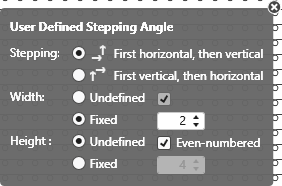
Creates a line according to the user defined stepping. | |


 The following settings are available for user defined lines only:
User Defined Stepping Angle
|
Stepping: |
Specify the sequence of steppings. |
|
|
Execute stepping first horizontally, then vertically. |
|
|
Execute stepping first vertically, then horizontally. |
|
Width: |
Set the width of the steps. |
|
|
Steps with any width |
|
|
Steps width the specified width |
|
|
Step width with an even quantity of wales |
|
Height : |
Set the height of the steps. |
|
|
Steps with any height |
|
|
Steps width the specified height |
|
|
Step height with an even quantity of knitting rows |
|
|
Restore the default behavior of the current drawing tool. |
|
|
Apply Data of Drawing Echo to Pattern Only active with |


|
|
Select |
