Carriage Direction
|
|
Make settings for the carriage direction. |

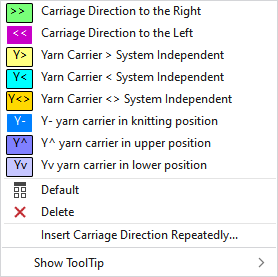
You have the following options in the context menu:
|
|
The carriage direction of this technical row is from left to right. |
|
|
The carriage direction of this technical row is from right to left. |
|
The following settings are used for carriage independent yarn carrier runs. | |
|
|
Sets the yarn carrier direction for a system independent yarn carrier run to the right.
|
|
|
Sets the yarn carrier direction for a system independent yarn carrier run to the left.
|
|
|
Sets the yarn carrier direction for a system independent yarn carrier run to undefined.
|
|
|
Places the yarn carrier in knitting position.
|
|
|
Places the yarn carrier in upper position.
|
|
|
Places the yarn carrier in lower position.
|
|
|
Sets the setting on Default.
|
|
|
Deletes the entry. |
|
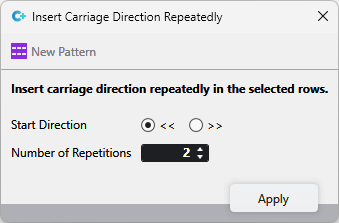
Insert Carriage Direction Repeatedly... |
For a row selection, open the dialog box in which you make the following settings:
|
|
Show ToolTip | |


 With ADF machines the yarn carriers have their own motors that move independently from the carriage run.