Comb
|
|
Make settings for the comb. |

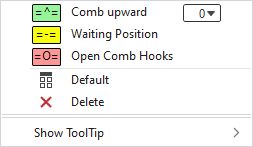
In the context menu you have the following options:
|
|
The comb moves to the delivering position upwards.
|
|
|
Moves the comb into waiting position below the needle bed. |
|
|
Opens the comb hooks and moves the comb to the lower limit switch. |
|
|
Sets the setting on Default.
|
|
|
Deletes the entry. |
|
Show ToolTip
|


 : The comb holds by the entered value in millimeters below the default position.
 : The comb holds by the entered value in millimeters above the default position.


 Applies the entry of the default setting from the header row.
