Second Stitch Tension (NPS)
|
|
Make settings for the front and rear second stitch tension.
|


 These control columns are only displayed for the CMS 730 S and CMS 830 S machines.
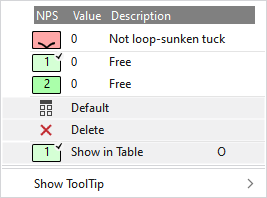
In the context menu you have the following options:
|
|
Use not sunken tuck. |
|
|
Select entries for the second stitch tension. The entries that are used in the pattern and those that are marked in the Pattern Parameters
with |
|
|
Sets the setting on Default.
|
|
|
Deletes the entry. |
|
|
Opens the displayed entry of the table for the second stitch tension in the Pattern Parameters . There you can select further NPS entries and make settings. |
|
Show ToolTip
|

 to
to 


 Applies the entry of the default setting from the header row.
