Yarn Length Control (YLC)
|
|
In the control column select the rows in the pattern in which the Yarn Length Control should be suspended. The operating mode of the Yarn Length Control is determined in Configuration -> More Settings. In the Pattern Parameters , Yarn Length sector make the settings for the yarn length control. |

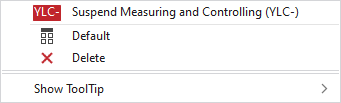
In the context menu you have the following options:
|
|
Suspends the measuring and regulating in the selected area. |
|
|
Sets the setting on Default.
|
|
|
Deletes the entry. |
|
Show ToolTip |


 Applies the entry of the default setting from the header row.
