Protection Rows
Protection Rows Section
|
|
Use protection rows. | |
|
Pattern Colors |
Options for the pattern color of protection rows. | |
|
|
|
Using the pattern color of the last knitting row |
|
|
The pattern color of the module is used in the protection rows.
| |
|
|
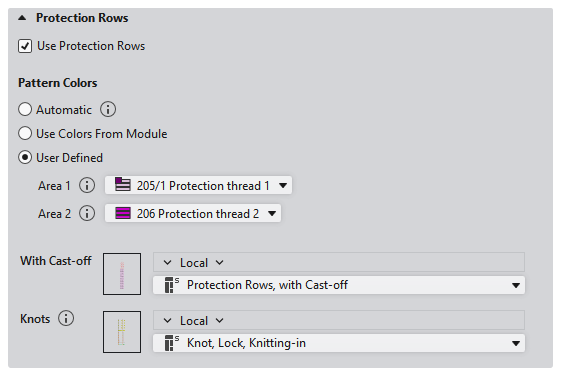
Select the colors for the areas of protection rows. | |
|
Area 1 |
Protection Row Yarn Colors: Default and for the area at the right of the opening This setting is only used in one area. If the selection is set to automatic, the basic color or the color of the last pattern row is applied. | |
|
Area 2 |
Protection row yarn color for the area at the left of the opening When two areas are knitted at the fabric end, Area 1 is applied on the right and Area 2 is applied on the left. For example with fully fashioned fabric with collar opening. | |
|
Without Cast-off |
If a machine without comb or with a switched off comb is selected, the selection Without Cast-off appears. Select the module for the protection rows at fabric end. The modules from the Technical Modules / Special Fabric Pieces / Protection Rows, without Cast-off module group are available.
| |
|
With Cast-off |
If a machine with an active comb is selected, the selection With Cast-off appears. Select the module for the protection rows at fabric end. The modules from the Technical Modules / Special Fabric Pieces / Protection Rows, with Cast-off module group are available.
| |
|
Knots |
Select the module for the knot of the protection row thread. The modules from the Technical Modules / Intarsia, Knitting-in/Knitting-out / Knot at Start module group are available.
| |


