Status bar of the lined shape
Status bar of the lined shape

In the left area of the status bar are displays that refer to the cursor position.
|
|
Display of the cursor coordinates. |

You can make layout settings for the document window in the right area.
|
|
Show Symmetry Axis |
|
|
Show Stitch Grid |
|
|
Show Chart Axes |
|
|
Show Control Dimensions |
|
|
Show Symbols of Marking Points |
|
|
Hide Knitting Ranges |
|
|
Show Knitting Ranges |
|
|
Show Knitting Ranges (yarn color) |
|
|
Show Knitting Ranges (CA color) |
|
|
Move selected object (shape point, marking point, knitting range or shape element) with the arrow keys of the keyboard (shape points with stitch input format only) |


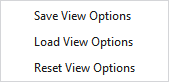
Make the following settings in the context menu of the status bar:
|
Save View Options |
Saves the current settings of the status bar as default. New lined shape projects will appear with the saved default settings. |
|
Load View Options |
Loads the default settings of the status bar. |
|
Reset View Options |
Resets the settings of the status bar and the default setting to the STOLL default. |
For this, see also
- Working in the line table or in the document window (graphic)
- Fully Fashion-Pattern: Front with V-neck and Structure
- Fully Fashion-Pattern: Front with V-neck and Binding-off
- Fully Fashion-Pattern: Front with neckline and shoulder gore by types of shape elements
- Fully Fashion-Pattern: Back with French Shoulder
- Fully Fashion-Pattern: Fabric Piece with Multi-step Widening and Multi-step Narrowing
- Fully Fashion-Pattern: Front with V-neck and dart type of shape element
- Fully Fashion-Pattern: Front with V-neck and Knitting Ranges