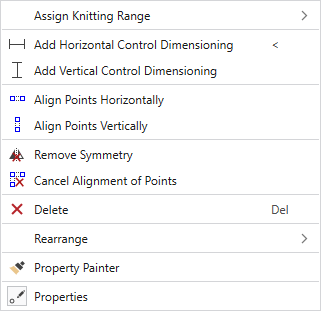
Context Menu on a Marking Point
|
Assign Knitting Range |
Adds a knitting area to the marking point. |
|
|
Adds a horizontal control dimensioning. Control dimensions can be defined between any two markings in the shape. The measure is entered in cm. |
|
|
Adds a vertical control dimensioning. Control dimensions can be defined between any two markings in the shape. The measure is entered in cm. |
|
|
Keeps two or more points horizontally aligned at the same height. Follow the hints! |
|
|
Keeps two or more points vertically aligned at the same width. Follow the hints! |
|
|
Cancels the symmetry of a point by click on it. Not available with marking points of a shape line. |
|
|
Cancels the alignment in vertical or horizontal direction. Click the desired points. |
|
|
Deletes an object by click on it in the view. |
|
Rearrange |
Select a new arrangement of the marking point from the offered options. Not available with marking points of a shape line. |
|
|
Copies the properties of the object (shape line or marking point) by click on it and transfers it to the object you click on next. Not available with marking points of a shape line. |
|
|
Shows the tool window with the properties of the selected marking point. Not available with marking points of a shape line. |


