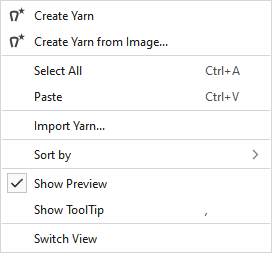
Context menu on the empty area
|
|
Generates a new local yarn. The yarn is saved in the Yarns tool window. |
|
|
Generates a new local yarn from an image of a previously scanned yarn. The yarn is saved in the Yarns tool window. |
|
Select All |
Selects all yarns. |
|
Paste |
Pastes the copied yarn. |
|
Import Yarn... |
Imports a yarn from any folder. |
|
Sort by |
Sorts the yarns by name.
Sorts the yarns by modified date.
You can move the yarns inside of the content view as desired. This arrangement is saved as User Defined and with this call-up it is also displayed again. |
|
|
In the tooltip on the yarn appears the preview. |
|
|
In the tooltip on the yarn appears the tooltip. |
|
Switch View |
Switches the view of the yarns between tiles and list. |

