General
General Section
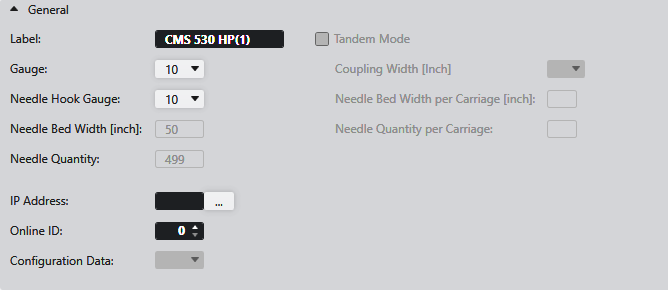
Make the following settings in the General section:
|
Label |
Enter designation for your own machine. |
|
Gauge:
|
Select the gauge of the machine. |
|
Needle Hook Gauge: |
Select the needle hook gauge. |
|
Needle Bed Width [inch]: |
Shows the working area in inches per carriage. |
|
Needle Quantity: |
Shows the needle quantity, that corresponds to the working area in inches per carriage. |
|
IP Address: |
Select Machine from SNS Server... Conditions to send knitting programs directly to a machine. |
|
Online ID: |
Enter online ID number |
|
Configuration Data |
Select a Configuration Template. All valid configuration templates present in the selected directory are available for selection.
|
|
|
Activate the tandem mode.
|
|
Coupling Width [Inch]
|
Select coupling width which the machine is to use in tandem mode. |
|
Needle Bed Width per Carriage [inch]: |
Displays the working area in inches that results from the coupling width. |
|
Needle Quantity per Carriage: |
Shows the needle quantity, that corresponds to the working area in inches per carriage. |


 The menu is grayed out if no valid configuration template is in this directory.