Statistics
You will find the statistical evaluations of the needle data, the knitting elements and of different sections of Setup Data in the Statistics dialog box.
You can open the Statistics dialog box in the Dialog Boxes ribbon group of the Home ribbon.
Areas
You can access the Statistics dialog box in the context menu of the following realms: 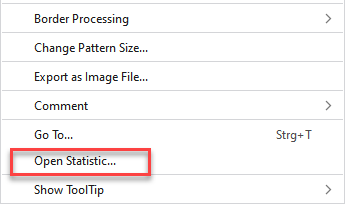
- Design Symbol View
- Expanded Symbol View and Processed Symbol View
- Knitting Elements
- Color Arrangements
- Module Arrangements
- Pattern Elements
Description
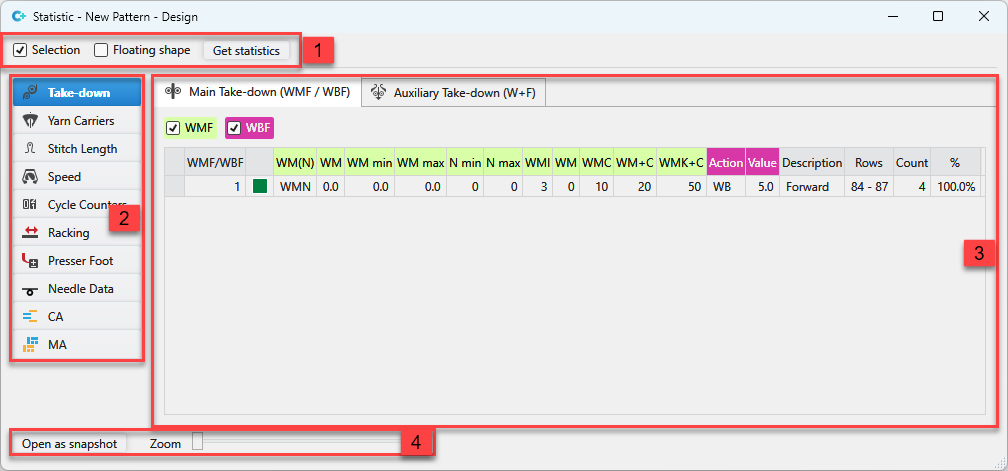
Make the following settings in the Statistics dialog box:
|
1 |
Define the scope and recalculate the statistical data. | |
|
|
Define the statistics for a selected area of the pattern | |
|
|
Define statistics of the pending shape. | |
|
Get Statistics |
Re-determine the statistics data. | |
|
2 |
Select the section of the statistics. | |
|
3 |
Presentation of the entries. | |
|
4 |
Open a second view and make zoom settings. | |
