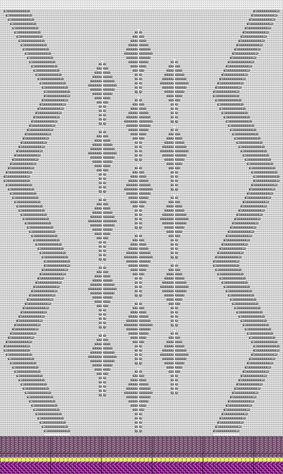
Pattern 20: SJ, Pointelle + Split-stitch technique

Machine

  • As desired
    • Example for CMS 530 HP, E3,5.2 (classification 656)

  • Knitting Technique
    • All Needles
  • Filling Elements
    • Any yarn color
    • Front Stitch with Transfer
  • Start
    • Start, 1x1 :
    • 1 system
    • Without elastic thread
    • With Protection Thread
    • Loose row

Pattern Project

Pattern-20.spf

Lined Shape Project

Without shape

  • Working with knitting elements of :
    • Directory Structure Modules / Standard / Pointelle
    • Directory Structure Modules / Standard / Pointelle, Closing/Split
  • Config­uration Dialog Box
    • Preset with System Functions

  1. Create a pattern project with one pattern.
  2. Draw design pattern (basic pattern) with knitting elements of the database and create a pattern element.
  3. Define the System Settings
  4. Start the Technical Processing.
  5. Generate knitting program.
    Sintral, Jacquard, Setup
  6. Run the Sintral Check.
  7. Load and set up the knitting program on the machine.