Needle Actions
Needle Actions
Home tab -> Tool Windows -> Needle Actions
In the Needle Actions tool window select the needle actions to draw.
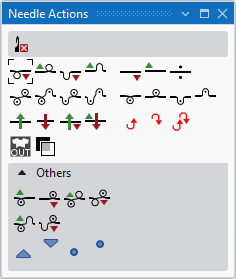
The following symbols are available for selection.
 With every needle action with transfer, is the transfer carried out first, when necessary, and then the needle action.
|
|
Delete Needle Action Can be selected in addition (with the CTRL key pressed) to a needle action. Only the selected needle action is deleted when drawing. All the other needle actions are retained. |
|
|
Front Stitch with Transfer |
|
|
Rear Stitch with Transfer |
|
|
Front Tuck with Transfer |
|
|
Rear Tuck with Transfer |
|
|
Float with automatic transfer to the front |
|
|
Float with automatic transfer to the rear |
|
|
Float |
|
|
Front Stitch - Rear Stitch |
|
|
Front Stitch - Rear Tuck |
|
|
Front Tuck - Rear Stitch |
|
|
Front Tuck - Rear Tuck |
|
|
Front Stitch |
|
|
Rear Stitch |
|
|
Front Tuck |
|
|
Rear Tuck |
|
|
Weft yarn / Transferring to the Rear with Float |
|
|
Weft Yarn / Transferring to the Front with Float |
|
|
Weft yarn / Transferring to the Rear with Preparing |
|
|
Weft yarn / Transferring to the Front with Preparing |
|
|
Cast-off in front without dissolving stitches |
|
|
Cast-off at rear without dissolving stitches |
|
|
Cast-off in front - Cast-off at rear without dissolving stitches |
|
|
Outside Shape |
|
|
Transparent |


Others
|
|
Front Stitch with Transfer to the Rear |
|
|
Rear Stitch with Transfer toward Front |
|
|
Front Stitch - Rear Stitch with Transfer to the Rear |
|
|
Front Stitch - Rear Stitch with Transfer to the Front |
|
|
Front Stitch - Rear Tuck with Transfer to the Rear |
|
|
Front Tuck - Rear Stitch with Transfer to the Front |
|
|
Do not sink at front Can be drawn in in addition to other needle actions. |
|
|
Do not sink at rear Can be drawn in in addition to other needle actions. |
|
|
Motif Thread at Front |
|
|
Motif Thread at Rear |


