Shape Properties
You make the following settings in the Shape Properties dialog box:
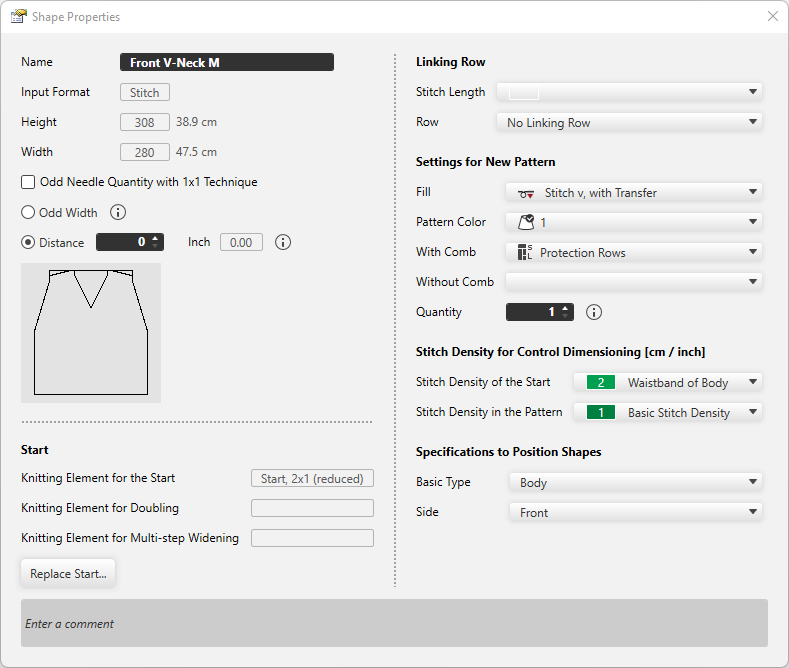
|
Name |
Displays the name of the shape. |
|
Input Format |
Shows the input format.
|
|
Height |
The height of the shape appears . |
|
Width |
The width of the shape appears. |
|
|
With 1x1 technique the width is set to an odd needle quantity. |
|
|
Adds one needle to the width of the symmetrical shape to get an odd width in total. Widens a mirrored shape by one needle. This setting is only available for mirrored shapes. |
|
|
Space between the two halves of the fabric pieces
|


 You can separate asymmetrical shapes as well.
Start
|
Knitting Element for the Start |
The knitting element for the start appears. |
|
Knitting Element for Doubling |
The knitting element for Doubling appears. |
|
Knitting Element for Multi-step Widening |
The knitting element for multi-step widening appears. |
|
Replace Start |
Opens the Replace Start dialog box. Make the settings for the Start, Doubling and multi-step widening. |
Linking Row
|
Stitch Length |
Select the stitch length for the linking row. |
|
Row |
Select row where the selected stitch length should have an effect. |

Settings for New Pattern
|
Fill |
Select fill for the new pattern. |
|
Pattern Color |
Select pattern color for the new pattern. |
|
With Comb |
Select the knitting technique for the protection rows with comb. |
|
Without Comb |
Select the knitting technique for the protection rows without comb. |
|
Quantity |
Enter the quantity of patterns that should be knitted in the sequence. |

Stitch Density for Control Dimensioning [cm / inch]
|
Stitch Density of the Start |
Select the stitch density for the start. Entries of the Stitch Density tool window are available. |
|
Stitch Density in the Pattern |
Select the stitch density for the pattern. Entries of the Stitch Density tool window are available. |
Specifications to Position Shapes
|
Basic Type |
Select the basic type of the shape. |
|
Side |
Select the side to which the shape relates. |
|
Enter a comment |
Enter a comment for the shape. |