How to Create a New Measure Graphically
- The dimensioned shape is open.
- Two marking points without dimensioning but at the desired distance
- The horizontal distance is to be fixed and added to the table
- 1
- Select the
 drawing tool.
 - 2
- Click the startpoint of the dimensioning.
- 3
- Drag the cursor to the target point of the dimensioning.

- 4
- Click the target point.
- The New Dimensioning dialog box appears.
- 5
- Click the
 New Dimension option.
 -
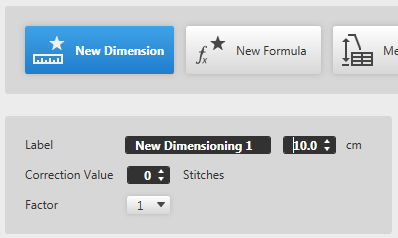
The distance of the points is displayed. (Here 10,0 cm)
The edit box for the designation of the new dimension gets active. - 6
- Click the edit box for the designation.
- 7
- Enter designation for the dimension.
New Horizontal Dimensioning - 8
- Confirm the input in the Dimensioning pop-up window with OK.
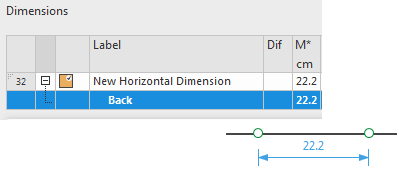
- A new line with the New Horizontal Dimensioning designation is added at the end of the Measure Table
- The new dimension is available for further dimensionings in the shape.
- The dimensioning arrow appears between the two points
 Note:
Note:
- Clean up the table after completion:
Remove unused dimensions. - With the
 New Formula option you can create a new formula for the active dimensioning.

 Possible Following Steps:
- How to Assign New Dimensionings
- How to Type-in the Measures of the Order
- How to Create Control Dimensionings
- How to Create New Dimensions
- How to Create New Formulas