New lined shape project (dialog box)
The  Nuevo proyecto de corte de líneas dialog box can be called up as follows:
In the Start window:
In the tab Archivo:
In the quick access toolbar of the lined shape project:
 Within a lined shape project, you can create, load and manage several lined shapes.
|
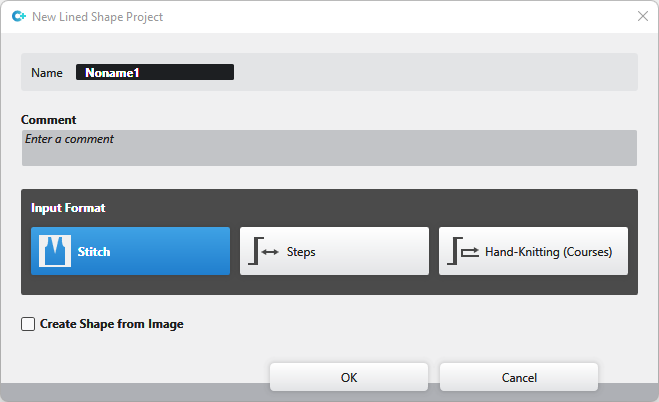
Nombre |
Enter name of the lined shape project |
|
Comentario |
Enter a comment to the lined shape project |
Select the Formato de entrada:
|
|
You enter the line by Malla. |
|
|
You enter the line by Pasos. |
|
|
You enter the line by courses as for hand knitting. |


|
|
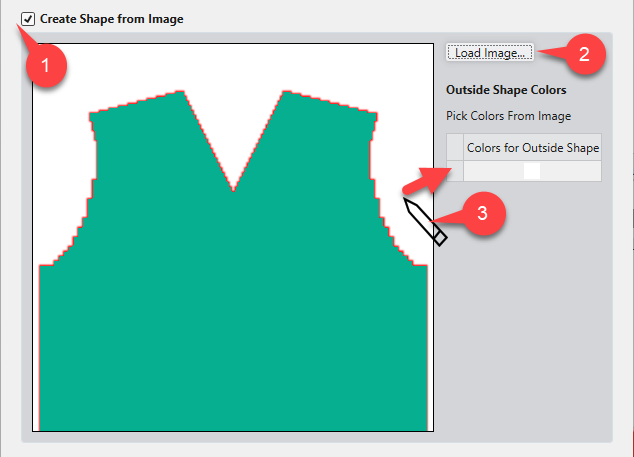
Create a lined shape from an existing image file.
|
|
Cargar imagen... (2) |
Cargar archivo de imagen como plantilla para el corte. |
|
Outside Shape Colors (3) |
Click the desired color of the image with the cursor.
|

 Within a lined shape project you can manage several lined shapes together in the Malla and Pasos input format.
Lined shapes in the Tisaje a mano (vueltas) input format cannot be managed together with lined shapes in the Malla or Pasos input format in the same lined shape project.
You can find examples to create lined shapes here:
- Muestra Fully Fashion: Pieza delantera con escote en V para estructura
- Muestra Fully Fashion: Pieza delantera con tipos de elemento de corte Escote e Inserción (hombro)
- Muestra Fully Fashion: Pieza delantera con escote y sectores de tisaje
- Muestra Fully Fashion: Pieza delantera con escote y tipo de elemento de corte Pinzas
- Muestra Fully Fashion: Pieza delantera con escote y remallado
- Muestra Fully Fashion: Pieza de tisaje con aumento en varios pasos y menguado en varios pasos
- Muestra Fully Fashion: Espalda con espalda francesa
- Trabajar con cortes