Marking Point Properties
Inicio tab -> Propiedades group ->  Propiedades del punto de marca
 If you have opened a shape in the pattern project, you can find the Propiedades del punto de marca tool window under the Edición del corte tab -> Propiedades group.
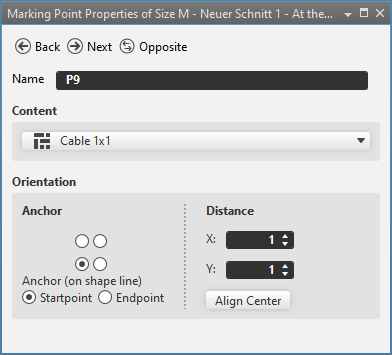
In the Propiedades del punto de marca tool window you make the following settings for the marking points.
|
|
Regresa del objeto seleccionado al objeto anterior del mismo tipo |
|
|
Del objeto seleccionado prosigue al próximo objeto del mismo tipo |
|
|
Cambia del objeto seleccionado al correspondiente objeto reflejado. Sólo disponible para objetos simétricos. |
|
Nombre |
Name of the selected marking point. |
|
Contenido |
Select a Elemento de tisaje that is inserted as a marking.
|
|
Alineamiento |
Specify the Alineamiento of the marking. |
|
Ancla |
Using the
|
|
Ancla (en línea de corte) |
Specify the anchor on the shape line. Only available for markings on shape lines. |
|
|
Ancla is located on the startpoint of the shape line. |
|
|
Ancla is located on the endpoint of the shape line. |
|
Distancia |
Enter distance to Ancla. |
|
X |
Enter X-coordinate of Posición. |
|
Y |
Enter Y coordinate of Posición. |
|
Alinear al centro |
Inserts the knitting element centered. |


 options, specify the orientation of the knitting element.