Quick Access Toolbar
In the quick access toolbar you have access at any time to the following commands:
 The quick access toolbar can be found at the left border of the title bar.

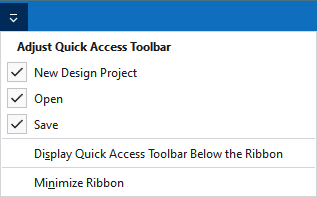
Using the drop-down menu you can display and hide some commands in the quick access toolbar.
Make settings for the presentation of the ribbon.
|
|
Crear un nuevo proyecto de diseño. |
|
|
Abre el diálogo 'Abrir archivo'. |
|
|
Guardar |
|
|
Deshacer la última operación. |
|
|
Repite la última operación. |
|
|
Organizar los elementos de tisaje, es decir módulos, CA, MA y partes de muestra en el Knit Explorer. This command is always available in the quick access toolbar and cannot be hidden. |
|
Mostrar la Barra de herramientas de acceso rápido por debajo de la cinta de opciones |
Display the quick access toolbar under or above the ribbon. |
|
Minimizar la cinta |
Show or hide the ribbon. |


