Line Options Bar
|
Grosor de línea |
Enter the Grosor de línea. | |
|
Alineamiento |
|
Dibujar línea a la izquierda del cursor. |
|
|
Dibujar línea a izquierda y derecha del cursor. | |
|
|
Dibujar línea a la derecha del cursor. | |
|
Guión |
Set the length of the strokes of a dash line. | |
|
Vacío |
Set the length of the gaps of a dash line. | |
|
|
Generar una línea libre. | |
|
|
Create a line with an even step and remainder. | |
|
|
Generar una línea con un ángulo de 45º. | |
|
|
Generar un escalonamiento uniforme. | |
|
|
Genera una línea con especificaciones de escalonamientos personalizados. | |


 The following settings are available for user defined lines only:
User Defined Stepping Angle
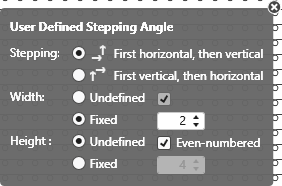
|
Stepping: |
Specify the sequence of steppings. |
|
|
Execute stepping first horizontally, then vertically. |
|
|
Execute stepping first vertically, then horizontally. |
|
Anchura: |
Set the width of the steps. |
|
|
Pasos con cualquier anchura |
|
|
Pasos con anchura fija |
|
|
Anchura de pasos con número par de columnas de mallas |
|
Altura: |
Set the height of the steps. |
|
|
Pasos con cualquier altura |
|
|
Pasos con altura fija |
|
|
Altura de pasos con número par d pasadas de tisaje |
|
|
Restaurar el comportamiento estándar de la herramienta de dibujo. |
|
|
Aplicar datos del eco de dibujo a la muestra Only active with |


|
|
Select |
