Color Arrangement
|
|
Make the settings for the Color Arrangements. Select, edit and draw Color Arrangements. |

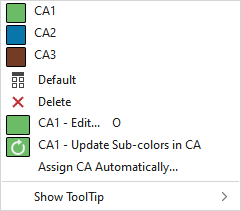
You have the following options in the context menu:
|
|
Select a Color Arrangement to draw. All Color Arrangements available in the pattern are offered for selection. |
|
|
Sets the setting on Estándar.
|
|
|
Deletes the entry. |
|
|
Open and edit the Color Arrangement of the cursor position. |
|
|
If you have drawn new sub-colors in an area in which this CA is used, they are inserted in the CA. Then the CA is opened. If you have deleted sub-colors in the area, the corresponding segments are not removed from the CA. |
|
|
If the CA appears in more than one pattern, this option appears in the context menu. A new CA is generated for all areas of this CA in the active pattern. The entries of the original CA in the control column are overwritten with the new CA. If you have deleted sub-colors in the areas, the corresponding segments are not removed from the CA. |
|
Asignar CA automáticamente... |
The Asignar Color Arrangements automáticamente dialog box appears. Make the desired settings inside. The color sequences are checked in the defined search area. In case of matching the available CAs, they are inserted automatically as specified in the settings. |
|
Mostrar información rápida |
 CA1 to
  CA3
CA3
 Applies the entry of the default setting from the header row.


Further Information:
- Directorio Color Arrangements con tipo de elemento de tisaje: Color Arrangement
- Duplicate, Mirror and Replace CAs:
Pop-up Dialog with Knitting Elements