Status bar of the Jacquard Editor
Left and middle area of the status bar
Displays that refer to the cursor position.
|
|
Shows the coordinates of the cursor position. |
|
|
Shows the Jacquard color at the cursor position. |


Right area
Here you can make layout settings for the document window.
|
|
Visualizar comentarios |
|
|
Mostrar cuadrícula |
|
|
Opens the Opciones tool window |


Tool Window Opciones
Make the following settings here:
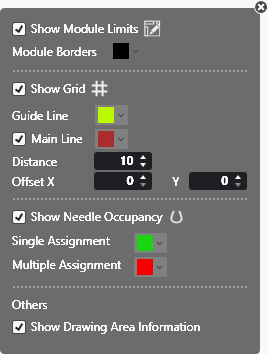
|
|
Displays the grid. |
|
Línea auxiliar |
Select the color of the help lines. |
|
|
Display the main lines. Select the color of the main line. |
|
Distancia |
Enter the distance of main lines between each other. |
|
Offset |
Enter offset from which the main lines are used. |


In the lower area of the status bar you have access to the Jacquard colors.

Select any color for drawing.