Status bar of the lined shape
Status bar of the lined shape

In the left area of the status bar are displays that refer to the cursor position.
|
|
Display of the cursor coordinates. |

You can make layout settings for the document window in the right area.
|
|
Mostrar eje de simetría |
|
|
Mostrar retícula de mallas |
|
|
Visualizar ejes de diagrama |
|
|
Mostrar dimensionamientos de control |
|
|
Mostrar los símbolos de los puntos de marca |
|
|
Ocultar sectores de tisaje |
|
|
Mostrar sectores de tisaje |
|
|
Mostrar sectores de tisaje (color de hilo) |
|
|
Mostrar sectores de tisaje (color de CA) |
|
|
Mover el objeto seleccionado (punto de corte, punto de marca, sector de tisaje o elemento de corte) con teclas de flecha del teclado (punto de corte solo en el formato de entrada Malla) |


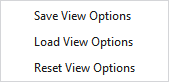
Make the following settings in the context menu of the status bar:
|
Guardar representación |
Saves the current settings of the status bar as default. New lined shape projects will appear with the saved default settings. |
|
Cargar representación |
Loads the default settings of the status bar. |
|
Restablecer representación |
Resets the settings of the status bar and the default setting to the STOLL default. |
Para ello, véase también
- Trabajar en la tabla de líneas o en la ventana de documento (gráfico)
- Muestra Fully Fashion: Pieza delantera con escote en V para estructura
- Muestra Fully Fashion: Pieza delantera con escote y remallado
- Muestra Fully Fashion: Pieza delantera con tipos de elemento de corte Escote e Inserción (hombro)
- Muestra Fully Fashion: Espalda con espalda francesa
- Muestra Fully Fashion: Pieza de tisaje con aumento en varios pasos y menguado en varios pasos
- Muestra Fully Fashion: Pieza delantera con escote y tipo de elemento de corte Pinzas
- Muestra Fully Fashion: Pieza delantera con escote y sectores de tisaje