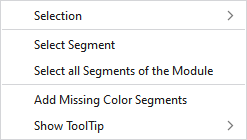
Context Menu on the Search Area of MA
|
Selección |
Select |
The functions of the menu bar Selección are also available in the context menu. |
|
Proteger |
A selection can be protected from interventions. | |
|
Seleccionar segmento |
Select the segment at the cursor position | |
|
Seleccionar todos los segmentos del módulo |
Select all related segments | |
|
Agregar segmentos de color faltantes |
Add not available color segments A Module Arrangement consists of color segments that are necessary for the use free of errors in the pattern. These are applied using this instruction if they are not available. | |
|
Mostrar información rápida |
|
Activates the tooltip in the needle area. |
|
|
Activates the tooltip in the control columns. | |
|
|
The coordinates of the drawing are shown when drawing. | |

