Quick Access Toolbar (MC Jacquard Editor)
In the quick access toolbar you have access at any time to the following commands:

Using the drop-down menu you can display and hide the commands in the quick access toolbar and make settings.
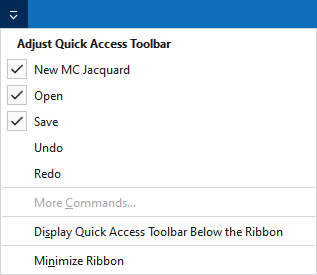
Personalizar barra de herramientas de acceso rápido
The following commands can be displayed and hidden in the quick access toolbar:
|
|
Crear un nuevo MC Jacquard (*.jac). |
|
|
Abre el diálogo 'Abrir archivo'. |
|
|
Guardar |
|
|
Deshacer la última operación. |
|
|
Repite la última operación. |


Make settings for the quick access toolbar and the ribbon:
|
Mostrar la Barra de herramientas de acceso rápido por debajo de la cinta de opciones |
Display the quick access toolbar under or above the ribbon. |
|
Minimizar la cinta |
Show or hide the ribbon. |