Specify Editing Layer
Editing Layer
If a shape is positioned on the pattern, you are able to edit the shape as well as the pattern independently from the other.
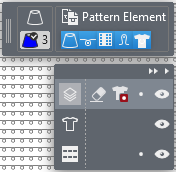
Below the display of the drawing attributes, a dialog box appears where you select the layer to edit and where you can make different settings.
|
|
Hide or display user control Hides or displays the entire layer control. | |
|
|
Hide or display the processing options Hides or displays the processing options of the different layers. | |
|
|
Editar capa de refinamiento In the Finishing layer you can make needle-exact adjustments to the positioned shape without having to adjust the lined shape. The changes are not transferred to the lined shape. | |
|
|
Borrador de refinamiento Atributo de dibujo Borrador para borrar en la capa de refinamiento. | |
|
|
Transparencia del corte flotante Atributo de dibujo Transparencia para rechazar los datos de la capa de corte. | |
|
|
Bloquear capa de refinamiento | |
|
|
Mostrar u ocultar capa de refinamiento | |
|
|
Editar capa de corte de líneas (Y) If Edit Lined Shape Layer is active, appears the Edición del corte ribbon. | |
|
|
Mostrar u ocultar capa de corte de líneas | |
|
|
Editar capa de muestra | |
|
|
Bloquear capa de muestra | |
|
|
Mostrar u ocultar capa de muestra | |
|
|
Move the shape on the pattern during the selection of the lined shape layer appears a button, that allows you to move the shape on the pattern. The shape is moved by steps of ten with a pressed CTRL key. | |


