Attributes
Attributes
You can draw with attributes by selecting a color and a structure. The selection appears in the cursor attributes as follows: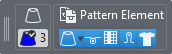
If no attribute is selected, the area will only be selected.If no attribute is selected, the area will only be selected.
 When you have selected Cursor Attributes and want to create a selection without having to select the Cursor Attributes again, click the ^ and keep the button pressed.
The cursor attributes disappear as long as you keep the key pressed.
This way you can create a selection and as soon as you release the ^ button, the Cursor Attributes are displayed again.
When you press the ESC button, the Cursor Attributes disappear and they can be displayed again with the ^ button.