Shape Data Tab
You make the following settings on the Configuración dialog box / Datos del corte tab: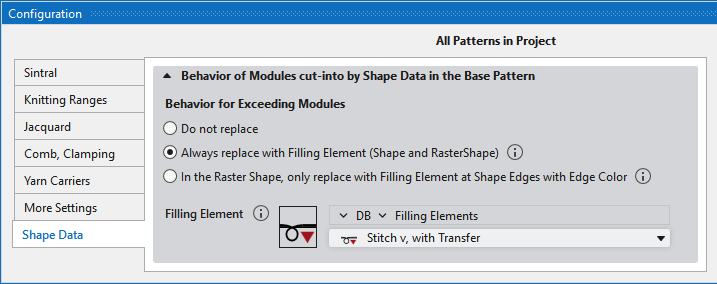
Comportamiento de módulos seccionados por datos de la forma en la muestra de diseño Section
|
Comportamiento de módulos seccionados |
Specify the behavior of exceeding modules. |
|
|
The exceeding modules will not be replaced. |
|
|
The exceeding modules will always be replaced by the selected filling element.
|
|
|
The exceeding modules will be replaced by the selected filling element in the raster-shape only at shape edges with edge color.
|
|
Elemento de relleno para módulos eliminados |
Select a knitting element to fill the vacant needle positions. Only select modules of size 1x1
|

 The result is visible in the raster-shape only after expanding the pattern.