Insert...
|
|
Abre el diálogo para insertar las pasadas o columnas seleccionadas. |

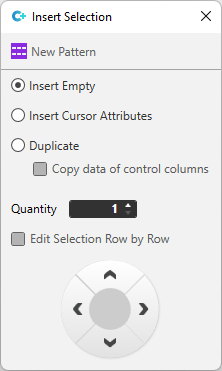
Make the following settings in the Insertar selección tool window:
|
|
Inserts an empty area. |
|
|
The inserted area is filled with the cursor attributes. |
|
|
Duplicates the selected area. |
|
|
The control column data is included when duplicating. |
|
Cantidad
|
Number of repetitions that are to be inserted |
|
|
Selection is edited by rows and not as the whole area.
|
|
|
Selection is edited by columns and not as the whole area.
|
|
|
By clicking on the arrows, the action is carried out in the direction of the arrows. |


 Only available if entire rows are selected.