|
|
|
1
|
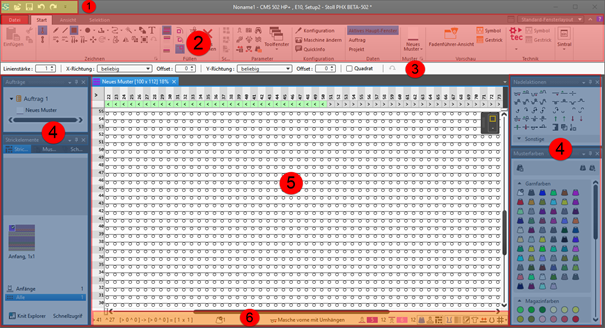
Quick Access Toolbar
|
Adjusting via the  selection list selection list
|
|
2
|
Ribbons
|
Ribbons containing the necessary groups for editing
-
Fichier
-
Accueil
-
Affichage
-
Sélection
 : The ribbon can be minimized. : The ribbon can be minimized.
|
|
3
|
Properties of Drawing Tools
|
Adjusts to the selected drawing tool
|
|
4
|
Tool Windows
|
Selection of the corresponding tool windows by  in the ribbon in the ribbon
: You can move the tool windows by the Left Mouse Button and dock them to the edges of the main window or position them floating freely.
|
|
5
|
Document Windows
|
Display and editing of pattern information
: You can move the tool windows by the Left Mouse Button and dock them in the center of the main window or position them floating freely.
|
|
6
|
Status Bar
|
-
Information about
- Cursor position
- Size when drawing
- Color and needle action of the design pattern at the cursor position
- Stitch length at the front / at the rear
-
Functions of controlling the view of the pattern
-
 Diviser l'affichage verticalement Diviser l'affichage verticalement -
 Couleur de dessin with needle action Couleur de dessin with needle action -
 Longueur de maille avant et arrière dans la zone d'aiguilles Longueur de maille avant et arrière dans la zone d'aiguilles -
 Couleur du module Couleur du module
Shows the module identifying color -
 Correction de groupe de la longueur de la maille (NPGK) Correction de groupe de la longueur de la maille (NPGK)
Display of the colors for the individual NPGK definitions - #1 Configurer la vue...
View (#1-#5) possible -
 Grandes icônes de forme
 -
 Afficher les ombrages de structure Afficher les ombrages de structure -
 Afficher les limites du module Afficher les limites du module -
 Afficher le chevalement Afficher le chevalement -
 Afficher l'occupation des aiguilles Afficher l'occupation des aiguilles -
 Affichage en fonction de la densité de maille Affichage en fonction de la densité de maille -
 Afficher les commentaires Afficher les commentaires -
 Afficher la grille Afficher la grille -
 : Options : Options
Settings for the needle occupancy and the grid -
Additional functions of controlling the view of the pattern after the technical processing
- Show the
 Couleur de guide-fil Couleur de guide-fil -
 Afficher le guide-fil Afficher le guide-fil
Display of the yarn carrier paths -
Functions of controlling the view of shapes
-
 Afficher l'axe de symétrie Afficher l'axe de symétrie -
 Afficher le quadrillage des mailles Afficher le quadrillage des mailles -
 Afficher les axes du diagramme Afficher les axes du diagramme -
 Afficher les cotes de contrôle dans les mailles. Afficher les cotes de contrôle dans les mailles. -
 Masquer les zones de tricotage Masquer les zones de tricotage -
 Afficher les zones de tricotage Afficher les zones de tricotage -
 Afficher les zones de tricotage (couleur de fil) Afficher les zones de tricotage (couleur de fil) -
 Afficher les zones de tricotage (couleur de CA) Afficher les zones de tricotage (couleur de CA) -
Afficher les icônes des points de marquage
-
 Dépalcer l'objet sélectionné (point de coupe, point de marquage, zone de tricotage ou élément de coupe) avec les touches flèches du clavier (point de coupe uniquement au format d'insertion Mailles) Dépalcer l'objet sélectionné (point de coupe, point de marquage, zone de tricotage ou élément de coupe) avec les touches flèches du clavier (point de coupe uniquement au format d'insertion Mailles)
|