Changing curve type of a shape line
Changing curve type:
- In the Line Table
- In the
 column open the context menu with the RMB and select the desired curve type.
 - Select line -> click the Propriétés des lignes button and select the desired curve type at
- In
 document window
 - Position the cursor on a line of the displayed graphic -> open the context menu with RMB and select -> Adapter l'évolution des escaliers....

- 1
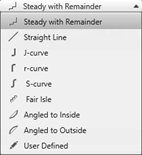
- In the selection menu, select the desired .
- 2
- When selecting the curve type
 homogène par rapport au reste under·, specify the desired values for and of the steps.
- The window for entering specifications is displayed according to the selected curve type.
- 3
- Transfer the input to the shape line with the Recalculate button.
- The shape line is displayed in the graphic and in the line table as well.