Symbol View
Fichier tab -> Call-up Options selection.
Select the Vue des icônes section in the  Options dialog box.
Make the following settings in the Vue des icônes section:
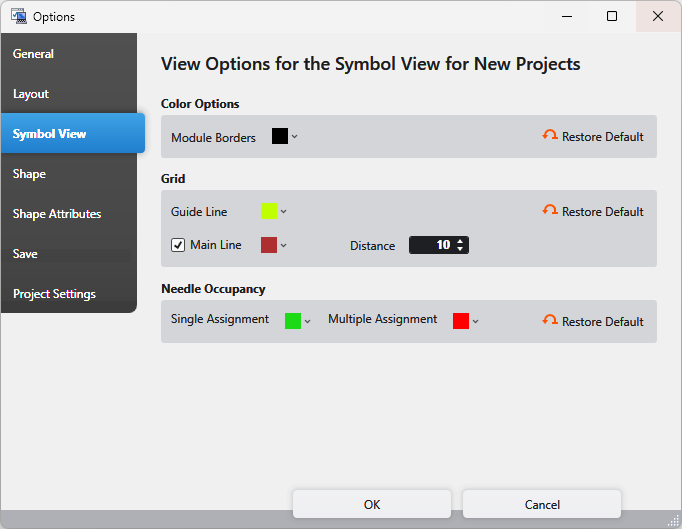
Options de couleurs Section
In the design view of a pattern, you can show and hide the module borders via the button  Afficher les limites du module of the status bar.
|
Limites du module |
Select the color of the module borders. |
|
Rétablir les valeurs par défaut |
Reset the color of the module borders to the default. |


Grille Section
You can toggle the grid for this document by the  Afficher la grille button of its status bar.
|
Ligne auxiliaire |
Select the color of the help lines. |
|
|
Display the main lines. Select the color of the main lines. |
|
Distance |
Enter the distance of main lines between each other. |
|
Rétablir les valeurs par défaut |
Reset the settings of the grid section to the default. |


Occupation des aiguilles Section
You can toggle the needle occupancy for this document by the  Afficher l'occupation des aiguilles button of its status bar.
|
Occupation simple |
Select the color for the display of the single assignment. |
|
Ocuupation multiple |
Select the color for the display of the multiple assignment. |
|
Rétablir les valeurs par défaut |
Reset the settings of the needle occupancy section to the default. |

