Shape Symbols
Shape Symbols
Accueil tab -> Fenêtre Outils -> Shape Symbols
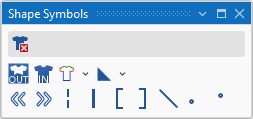
In the Shape Symbols tool window select the shape symbols to draw.
|
|
Supprimer les données de coupe Can be selected in addition (with the CTRL key pressed) to a shape symbol. Only the selected shape symbol is deleted when drawing. All the other shape symbols are retained. |
|
|
Extérieur de la forme |
|
|
Intérieur de la forme |
|
|
Lisières de forme (F2)
|
|
|
Marquages de forme
|
|
|
Aligner vers la gauche |
|
|
Aligner vers la droite |
|
|
Goussets |
|
|
Séparation |
|
|
Remplir l'encolure |
|
|
Remplir l'encolure |
|
|
Masquer |
|
|
Longueur de maille sur lisière de forme avant |
|
|
Longueur de maille sur lisière de forme arrière |


 A selected shape symbol overwrites the existing shape symbols when inserting it into the pattern. You can enter it additionally with the CTRL key pressed. You can remove it by the CTRL-ALT key.