Fabric Preview
The fabric preview provides you with a direct, visual feedback at real-time of your design. The fabric preview simulates the stitch appearance. Several views and functions are available to you in the fabric preview.
Views of the fabric preview
|
|
Comprimé |
|
|
Représentation du chevalement When activating the distortion representation, the stitch distortion is automatically calculated. This is especially important with designs with stitch transfer, narrowings and Fully Fashion designs. |
|
|
Affichage en fonction de la densité de maille If the view is activated with stitch density ratio, your design is displayed depending on the established stitch density. This view can be especially helpful in case of graphic designs with rounded shapes. This display also serves as basis for the export of the fabric preview. |
|
|
Défaire les mailles coulées When activating the display of drop stitches it is possible that failures in the knitting design may become evident. |
|
|
Texture du fil When activating the yarn texture, the used yarn structures become visible. If the yarn texture is not activated, the stitches are displayed in a technical representation. |
|
|
Fond You have the option of individually coloring the background of your fabric view. Clicking on the Background icon, opens a color field where you can set the background color you prefer. |


Context menu of the fabric preview
You can display further views and functions with a right click on the fabric preview.
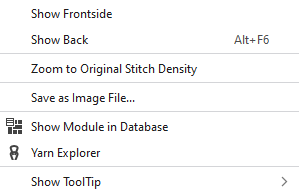
-
Afficher l'envers / Afficher l'endroit :
Here, you can quickly toggle between front and rear view -
Zoomer jusqu'à la densité des mailles d'origine :
This function allows you to zoom to the selected stitch density. -
Exporter comme fichier image...
:
With this function you can export the fabric preview as texture and the Maps as image file. -
Afficher le module dans la base de données :
Via this function the modules used in the design can quickly be displayed in the database. -
Explorateur de fil :
Here, you can open the dialog of the yarn explorer. -
Afficher l'info-bulle :
The ToolTip gives you a fast insight in the positions and modules if you hover over the pattern with the cursor.