Marking Point Properties
Accueil tab -> Caractéristiques group ->  Propriétes du point de marquage
 If you have opened a shape in the pattern project, you can find the Propriétes du point de marquage tool window under the Élaboration de la coupe tab -> Caractéristiques group.
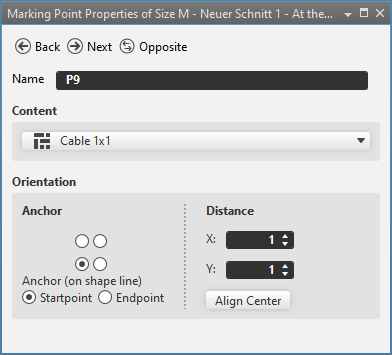
In the Propriétes du point de marquage tool window you make the following settings for the marking points.
|
|
Passe de l'objet sélectionné à l'objet du même type précédent |
|
|
Passe de l'objet sélectionné à l'objet du même type suivant |
|
|
Passe de l'objet sélectionné à l'objet correspondant en miroir. Uniquement disponible pour les objets symétriques. |
|
Nom |
Name of the selected marking point. |
|
Contenu |
Select a Élément de tricotage that is inserted as a marking.
|
|
Orientation |
Specify the Orientation of the marking. |
|
Ancre |
Using the
|
|
Ancrage (sur la ligne de coupe) |
Specify the anchor on the shape line. Only available for markings on shape lines. |
|
|
Ancre is located on the startpoint of the shape line. |
|
|
Ancre is located on the endpoint of the shape line. |
|
Distance |
Enter distance to Ancre. |
|
X |
Enter X-coordinate of Position. |
|
Y |
Enter Y coordinate of Position. |
|
Centrer |
Inserts the knitting element centered. |


 options, specify the orientation of the knitting element.