Context Menu of Pattern Elements
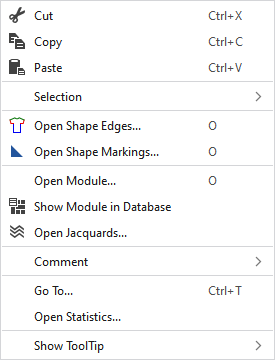
|
|
Supprime le contenu de la sélection et le copie dans le presse-papiers. | |
|
|
Insère le contenu de la sélection dans le presse-papiers. | |
|
|
Prend le contenu du presse-papiers sur le curseur (attributs du curseur). | |
|
Sélection |
|
Le Color Arrangement de la rangée sélectionnée est une proposition pour la séquence de tricotage. Par la sélection, vous déterminez d'abord l'étendue et la séquence des couleurs dans le Color Arrangement. |
|
|
Create a pattern element from the selection Crée une nouvelle partie de dessin à partir de la sélection en cours et l'ajoute à la fenêtre d'outils "Éléments du dessin". | |
|
Créer un MC jacquard... |
I. Generate a Jacquard area in the selected area. Opens the Élaborer un jacquard dialog box. | |
|
Mettre la sélection actuelle sur sur 'transparence' |
Sets the selected area in the pattern element to transparent.
| |
|
Select |
The functions of the menu bar Sélection are also available in the context menu. | |
|
Protéger |
A selection can be protected from interventions. | |
|
|
Opens the Lisières de forme tool window.
| |
|
|
Opens the Marquages de forme tool window.
| |
|
Ouvrir le module... |
Opens the module at the cursor position. | |
|
|
Shows the module at the cursor position in the Module Explorer. | |
|
|
Opens the Jacquard at the cursor position in the Jacquard table. | |
|
Commentaire |
Place a pin, comment, or graphic anywhere in the pattern. | |
|
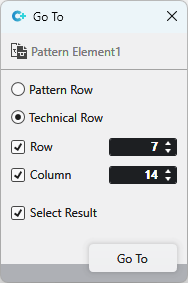
Aller à... |
Select Enter
| |
|
Open Statistics |
Open the Statistics dialog box. | |
|
Afficher l'info-bulle |
|
Activates the tooltip in the needle area. |
|
|
Activates the tooltip in the needle area, as well as a preview of the modules. | |
|
|
Activates the tooltip in the control columns. | |
|
|
Activates the tooltip in the control columns as well as a preview of CA and MA.
| |
|
|
The coordinates of the drawing are shown when drawing. | |


 Position the cursor on a shape edge in the pattern and press the


 and
and