Holding Down (PSv / PS^)
|
|
Make settings for the front and back holding-down device.
|


 These control columns are only available for CMS-T and BMS machines.
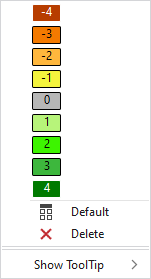
For CMS-T machines you have the following options in the context menu:
|
|
Make the setting of the holding-down jacks. Select value from -4 (completely pulled back) to 4 (completely closed)
|
|
|
Sets the setting on Default.
|
|
|
Deletes the entry. |
|
Afficher l'info-bulle |
 to
to 
 The values for front and back are dependent on each other.
 Applies the entry of the default setting from the header row.

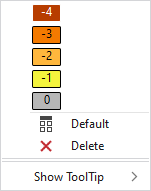
For BMS machines you have the following options in the context menu:
|
|
Make the setting of the holding-down jacks. Select value from -4 (completely pulled back) to 0 (home position, completely closed) |
|
|
Sets the setting on Default.
|
|
|
Deletes the entry. |
|
Afficher l'info-bulle |

- Niederhalteplatinen (Setup-Daten)
- Holding Down