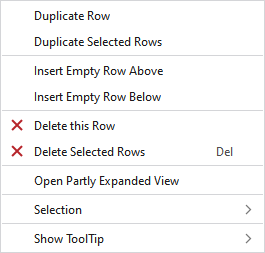
Context menu of the control column of the pattern rows
In the context menu on these control columns you have the following options:
|
Dupliquer la rangée |
Duplicated the row under the cursor. | |
|
Dupliquer les rangées sélectionnées |
Duplicates the selected rows. | |
|
Insérer rangée vide au-dessus |
Enters an empty row above the clicked row. | |
|
Insérer rangée vide au-dessous |
Enters a row under the clicked row. | |
|
|
Deletes the row at the cursor position. | |
|
|
Deletes all the selected rows. | |
|
Sélection |
Créer un MC jacquard... |
I. Generate a Jacquard area in the selected area.
|
|
|
Create a pattern element from the selection. Crée une nouvelle partie de dessin à partir de la sélection en cours et l'ajoute à la fenêtre d'outils "Éléments du dessin". | |
|
Select |
The functions of the menu bar Sélection are also available in the context menu. | |
|
Protéger |
A selection can be protected from interventions. | |
|
Afficher l'info-bulle
| ||


