Change Shape Dimensions
|
Taille de la destination |
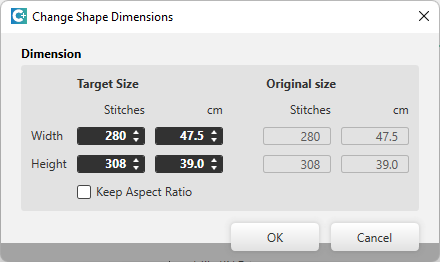
Enter the desired shape dimension in Mailles or cm.
Largeur
Hauteur |
|
|
When you modify a value, all others are adjusted according to the aspect ratio. |
|
Grandeur originale |
Shows the original size of the shape in Mailles and cm. |


- If the shape is positioned on a pattern:
- If necessary, adjust the size of the pattern.
- For ex. with Dupliquer les colonnes sélectionnées in the context menu of the column bar.
-
Sélection Ribbon → Sélection group →
 Insérer...
→ Insert...
Insérer...
→ Insert... - The dimension refers to the rewritten rectangle of the basis shape.
- When changing the dimensions, all shape elements are adjusted in the same ratio.