Create a Formula for the Height of the Armhole Narrowing
How to calculate the height of the armhole narrowing:
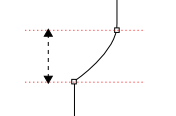
The height of the armhole narrowing is calculated relative to the width of the armhole narrowing.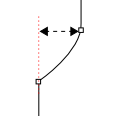
[Height of the Armhole Narrowing]/[Width of the Armhole Narrowing] = k
In this case the desired relation is 1.35. Means: k = 1.35.[Height of the Armhole Narrowing] = [Width of the Armhole Narrowing] *1,35
The width of the armhole narrowing on the other side is not an independent dimension, but instead it is derived from two other dimensions: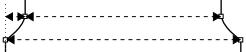
[Width of Armhole Narrowing] = ([Body Width at the Waistband] – [Shoulder Width])/2
This way the final formula results:[Height of the Armhole Narrowing] = ([Body Width at the Waistband] – [Shoulder Width])/2*1.35
How to create the formula:
- The Dimensions
 tool window is open.
- 1
- Open the context menu of the Row No. column of the Formula table.

- 2
- Select .
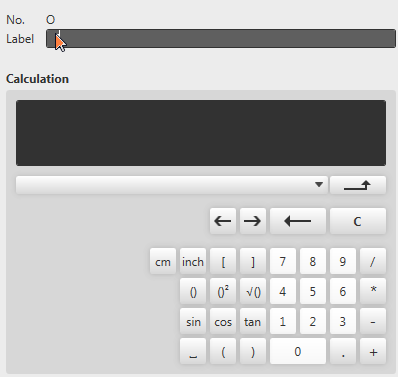
- The pop-up window Formula Editor appears.
- 3
- Enter the text Height of the Armhole Narrowing as label.
- 4
- Click the ( key.
- 5
- Select the Body Width at the Waistband dimension in the list box.

- 6
- Click the – button.
- 7
- Select the Shoulder Width dimension in the list box.
- 8
- Click the ) button.
- 9
- Click the / button.
- 10
- Click the 2 button.
- 11
- Click the * button.
- 12
- Click the 1, . , 3 and 5 buttons.
- The entry in the Calculation field is:
([Body Width at the Waistband]–[Shoulder Width])/2*1.35 - 13
- Confirm with
 .
. - The Formula Editor closes.
- A row with the Height of the Armhole Narrowing formula is added at the bottom of the Formula table.