Create Dimensions
The dimensions that are not contained in the Private shape type by default can be entered in the Dimensions table.
|
Label |
Length (cm) |
|---|---|
|
Linking Tubular of Armhole Cuff |
0,8 |
|
Height of the Armhole Cuffs |
3 |
- The Dimensions
 tool window is open.
- 1
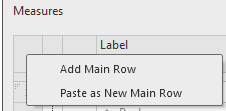
- Open the context menu of the Row No. column of the Dimensions table.
- 2
- Select .
- A row with a default designation is added at the bottom of the table.
- 3
- Click on the cell of the Label column.
- 4
- Enter the text Linking Tubular of Armhole Cuff as label.
- 5
- Enter the value 0,8 in the M* (cm) column.
- The dimension Linking Tubular of Armhole Cuff is available for dimensionings in the shape.
To add the Height of the Armhole Cuffs dimension proceed the same way.