|
|
|
1
|
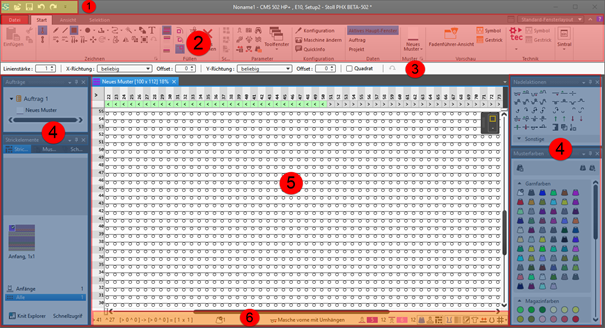
Quick Access Toolbar
|
Adjusting via the  selection list selection list
|
|
2
|
Ribbons
|
Ribbons containing the necessary groups for editing
-
File
-
Avvio
-
Vista
-
Selezione
 : The ribbon can be minimized. : The ribbon can be minimized.
|
|
3
|
Properties of Drawing Tools
|
Adjusts to the selected drawing tool
|
|
4
|
Tool Windows
|
Selection of the corresponding tool windows by  in the ribbon in the ribbon
: You can move the tool windows by the Left Mouse Button and dock them to the edges of the main window or position them floating freely.
|
|
5
|
Document Windows
|
Display and editing of pattern information
: You can move the tool windows by the Left Mouse Button and dock them in the center of the main window or position them floating freely.
|
|
6
|
Status Bar
|
-
Information about
- Cursor position
- Size when drawing
- Color and needle action of the design pattern at the cursor position
- Stitch length at the front / at the rear
-
Functions of controlling the view of the pattern
-
 Dividi vista verticalmente Dividi vista verticalmente -
 Colore del disegno with needle action Colore del disegno with needle action -
 Lunghezza della maglia davanti e dietro nella zona di aghi Lunghezza della maglia davanti e dietro nella zona di aghi -
 Colore del modulo Colore del modulo
Shows the module identifying color -
 Correzione lunghezza della maglia per gruppi (NPGK) Correzione lunghezza della maglia per gruppi (NPGK)
Display of the colors for the individual NPGK definitions - #1 Configura vista...
View (#1-#5) possible -
 Simboli grandi della forma
 -
 Mostra ombreggiatura della struttura Mostra ombreggiatura della struttura -
 Mostra limiti del modulo Mostra limiti del modulo -
 Mostra spostamento Mostra spostamento -
 Mostra occupazione aghi Mostra occupazione aghi -
 Visualizzazione nel rapporto di fittezza dei punti maglia Visualizzazione nel rapporto di fittezza dei punti maglia -
 Mostra commenti Mostra commenti -
 Mostra griglia Mostra griglia -
 : Opzioni : Opzioni
Settings for the needle occupancy and the grid -
Additional functions of controlling the view of the pattern after the technical processing
- Show the
 Colore del guidafilo Colore del guidafilo -
 Mostra guidafilo Mostra guidafilo
Display of the yarn carrier paths -
Functions of controlling the view of shapes
-
 Mostra asse di simmetria Mostra asse di simmetria -
 Mostra griglia delle maglie Mostra griglia delle maglie -
 Mostra assi del diagramma Mostra assi del diagramma -
 Mostra dimensionamenti di controllo Mostra dimensionamenti di controllo -
 Nascondi zone di lavoro Nascondi zone di lavoro -
 Mostra zone di lavoro Mostra zone di lavoro -
 Mostra zone di lavoro (colore del filato) Mostra zone di lavoro (colore del filato) -
 Mostra zone di lavoro (colore CA) Mostra zone di lavoro (colore CA) -
Mostra simboli dei punti di marcatura
-
 Spostare l'oggetto selezionato (punto di taglio, punto di marcatura, zona di lavoro o elemento di taglio) con i tasti di direzione della tastiera (punto di taglio solo nel formato input maglie) Spostare l'oggetto selezionato (punto di taglio, punto di marcatura, zona di lavoro o elemento di taglio) con i tasti di direzione della tastiera (punto di taglio solo nel formato input maglie)
|