Knitting Element for the Start

A STOLL knitting element of the Inizio type contains all variants for the options of a start.
Select the desired start in the Nuovo disegno dialog box.

Marcatura ranghi control column:

: The Marcatura ranghi control column appears only in the view of the Inizio knitting element type.

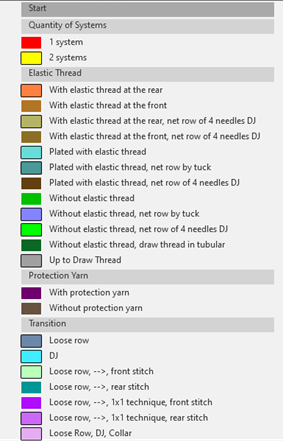
According to the color entries in the Marcatura ranghi control column, the selected start will be extracted from the knitting element in the Knit Explorer and saved as local knitting element in theElementi di lavoro tool window / Elementi di lavoro tab of the pattern project.

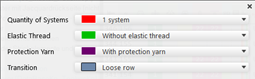
Filter the view of a start type knitting element:

Open the menu with the button and set the desired filter.

Enable the button to show the selected filter within the knitting element and the toolbar.

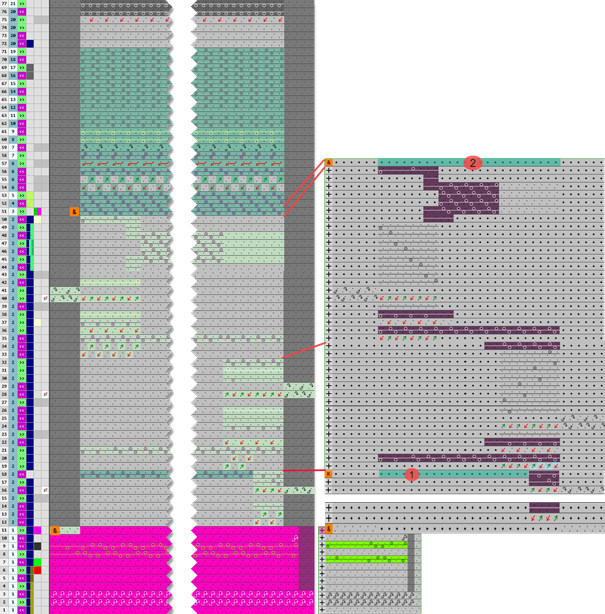
behavior of comb thread, Float and Lock and start

1

The Rango di esecuzione, modalità sovrascrittura del rango di riferimento marked in the Float and Lock knitting element will be placed on the first knitting row of the Inizio knitting element.

2

The Rango di esecuzione, modalità sovrascrittura defined in the Float and Lock knitting element will be placed on the second knitting row of the Inizio knitting element.

: The last Rango di esecuzione, modalità di inserimento of the knitting element Filo pettine will be inserted only if Float and Lock (ad un telo) is missing.