Shape Symbols
Simboli della forma
Avvio tab -> Finestre degli strumenti -> Simboli della forma
In the Simboli della forma tool window select the shape symbols to draw.
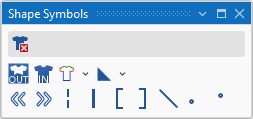
|
|
Elimina dati della forma Can be selected in addition (with the CTRL key pressed) to a shape symbol. Only the selected shape symbol is deleted when drawing. All the other shape symbols are retained. |
|
|
All'esterno della forma |
|
|
All'interno della forma |
|
|
Cimose della forma (F2)
|
|
|
Marcature della forma
|
|
|
Allineamento a sinistra |
|
|
Allineamento a destra |
|
|
Lavorazione a tasselli |
|
|
Separazione |
|
|
Riempi scollatura |
|
|
Riempi scollatura |
|
|
Dissolvenza |
|
|
Lunghezza della maglia in prossimità della cimosa della forma davanti |
|
|
Lunghezza della maglia in prossimità della cimosa della forma dietro |


 A selected shape symbol overwrites the existing shape symbols when inserting it into the pattern. You can enter it additionally with the CTRL key pressed. You can remove it by the CTRL-ALT key.