Creating Plating Colors and Draw it into the Color Arrangement or Design Pattern
Pattern Project With 4 Pattern Examples:
- 01_Muster_Pattern_CA1
- 1 Weft Yarn + Knitting
- 02_Muster_Pattern_CA2
- 2 Weft Yarns + Knitting
- 03_Muster_Pattern_CA3
- 3 Weft Yarns + Knitting
- 04_Muster_Pattern_CA4
- 1 Weft Yarn + Inverse Plating with 2 Yarn Carriers
Create plating colors for the pattern examples:
- 1
- Open the tool window Colori vanisé with
 in the Colori del disegno tool window.
 - The Colori vanisé tool window appears.
- 2
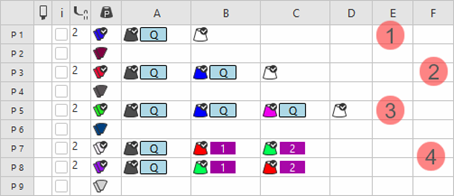
- Create the following plating colors in the table:
|
| |
|
1 |
Plating color P1 for Color Arrangement 1
|
|
2 |
Plating color P3 for Color Arrangement 2
|
|
3 |
Plating color P5 for Color Arrangement 3
|
|
4 |
Plating color P7 + P8 for Color Arrangement 4
|
- 1
- Set the type of presser foot in the
 Pressa W column.
 - 2
- Select the Pxx entry in the
 column.
 - The selected plating color can be drawn-in.
- 3
- Draw-in the plating color into the desired pattern rows of the Color Arrangement or of the design pattern.
- 4
- Close the tool window.
Draw the design pattern with any desired yarn color / magazine color / yarn carrier color or plating color:
- 1
- To draw, select the desired setting in the status bar
 .
. Colore del disegno
- or - Colore del modulo
 - 2
- Select drawing tool.
- 3
- Select any desired Colori del filato, Colori del magazzino, Colori dei guidafili or plating color in the Colori del disegno tool window and draw it into the design pattern.
|
Design Pattern of pattern 01 - 03 |
Design Pattern of pattern 04 |
|
|
|
|
|