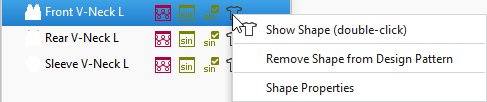
Context menu on the icon of the shape
You have access to the following functions in the context menu of the  icon of the shape:
 The icon of the shape appears when a shape was positioned on the pattern.
In the tooltip of the icon you see the name, a preview and the input format of the shape, as well as the patterns of the project where the shape is used.
|
|
Open shape. |
|
Rimuovi taglio da disegno design |
Remove shape from the pattern. |
|
Proprietà del taglio |
Opens the Proprietà del taglio dialog box |