Line Options Bar
|
Spessore di linea |
Enter the Spessore di linea. | |
|
Allineamento |
|
Tracciare la linea a sinistra del cursore. |
|
|
Tracciare la linea a sinistra e a destra del cursore. | |
|
|
Tracciare la linea a destra del cursore. | |
|
Tratto |
Set the length of the strokes of a dash line. | |
|
Interspazio |
Set the length of the gaps of a dash line. | |
|
|
Creare un linea libera. | |
|
|
Create a line with an even step and remainder. | |
|
|
Creare un linea nell'angolo di 45°. | |
|
|
Creare una scalatura uniforme. | |
|
|
Crea una linea con assegnazioni di scalatura personalizzate. | |


 The following settings are available for user defined lines only:
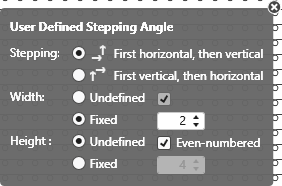
User Defined Stepping Angle
|
Stepping: |
Specify the sequence of steppings. |
|
|
Execute stepping first horizontally, then vertically. |
|
|
Execute stepping first vertically, then horizontally. |
|
Larghezza: |
Set the width of the steps. |
|
|
Passi di qualsiasi larghezza |
|
|
Passi con larghezza specificata |
|
|
Larghezza passi con numero pari di colonne dei punti maglia |
|
Altezza: |
Set the height of the steps. |
|
|
Passi di qualsiasi altezza |
|
|
Passi con altezza specificata |
|
|
Altezza passi con numero pari di ranghi di lavoro |
|
|
Ripristina comportamento standard dello strumento di disegno corrente. |
|
|
Applica dati dall'eco dei caratteri nel disegno Only active with |


|
|
Select |
